Saturday, January 1, 2011
Moving a Blog
Hi.
We decided to transfer our blog to a new account.
Please check our new blog here.
Caffeinated ~ cafetalk.com official flyer
Regards.
Cafetalk Team

Friday, November 26, 2010
Students are not familiar with Skype?
We know sometimes students will ask you general questions about Skype or how to use a particular feature.
We have now "Skype-guide" page.
If you receive a question about Skype, you can *politely* redirect them to this URL or FAQ(http://cafetalk.com/ja/page/faq).
Skype-guide Page
http://manual.cafetalk.com/skype-guide/
*Please check this article as well.
"Getting questions from students? You can direct them to our blog or FAQ."
If you have any questions, feel free to contact us.
Thank you!
ken
cafetalk
We have now "Skype-guide" page.
If you receive a question about Skype, you can *politely* redirect them to this URL or FAQ(http://cafetalk.com/ja/page/faq).
Skype-guide Page
http://manual.cafetalk.com/skype-guide/
*Please check this article as well.
"Getting questions from students? You can direct them to our blog or FAQ."
If you have any questions, feel free to contact us.
Thank you!
ken
cafetalk
Friday, November 5, 2010
Start creating interesting contents for students now!
Dear all,
We're pleased to announce that we've just released our new "Learning Tips" feature.
You can use it to share news clippings, study tips, cultural tidbits and other pieces of information that students might find interesting. It's quite similar to the the General Notices function but allows students to leave comments on it, and so we're hoping it will be become a more social area where users can exchange their opinions or share their thoughts on a common topic.
Incidentally, because the General Notices feature only allows one-way communication it should be used primarily for lesson-related announcements in future.
The articles you post through Contents will be searchable. In future we'll definitely feature popular articles in one way or another, so we hope it will serve as another channel for you to promote yourself and get students.
However, please don't post articles which primary purpose is to advertise yourself or your courses. Post information that would be genuinely beneficial for students. Cafetalk reserves the right to delete any articles that it deems to be inappropriate.
So if you have information you'd like to share go ahead and try it out!
Just log-in and click "Learning Tips" on the left menu.
If you have any questions,feel free to contact us.
Thank you!
Ken
Cafetalk
We're pleased to announce that we've just released our new "Learning Tips" feature.
You can use it to share news clippings, study tips, cultural tidbits and other pieces of information that students might find interesting. It's quite similar to the the General Notices function but allows students to leave comments on it, and so we're hoping it will be become a more social area where users can exchange their opinions or share their thoughts on a common topic.
Incidentally, because the General Notices feature only allows one-way communication it should be used primarily for lesson-related announcements in future.
The articles you post through Contents will be searchable. In future we'll definitely feature popular articles in one way or another, so we hope it will serve as another channel for you to promote yourself and get students.
However, please don't post articles which primary purpose is to advertise yourself or your courses. Post information that would be genuinely beneficial for students. Cafetalk reserves the right to delete any articles that it deems to be inappropriate.
So if you have information you'd like to share go ahead and try it out!
Just log-in and click "Learning Tips" on the left menu.
If you have any questions,feel free to contact us.
Thank you!
Ken
Cafetalk
Friday, October 1, 2010
Now you can add textbook info on your service page
Dear All,
Hi.
We have added textbook info on your service page.
We released it because many students asked us who use textbook, what kind of it, and so on.
So now you can log-in your page and click "services" on your left hand side, and choose from "none, original material, flexible, textbook( title,URL), other.
Please check it out!
If you have any questions please feel free to contact us.
Thank you!
Ken
cafetalk
Hi.
We have added textbook info on your service page.
We released it because many students asked us who use textbook, what kind of it, and so on.
So now you can log-in your page and click "services" on your left hand side, and choose from "none, original material, flexible, textbook( title,URL), other.
Please check it out!
If you have any questions please feel free to contact us.
Thank you!
Ken
cafetalk
Tuesday, September 28, 2010
Some updates for tutors
Friday, September 17, 2010
Top page renewal and some feature additions
Dear all,
We would like to inform you of some changes we just made to Cafetalk.com
1. Changed the TOP page design
2. Added a "search by time" function. Students can now search tutors who are available during a specific time.
3. The category which was "Speaking and Pronunciation" has been separated into "Speaking" and "Pronunciation".
We did this in response to overwhelming opinion that the two are taught completely differently.
All courses previously categorized as "Speaking and Pronunciation" are now listed under "Pronunciation" (simply because most of them were, in fact, pronunciation courses) but please change it if necessary.
Thank you!
Cafetalk Team
We would like to inform you of some changes we just made to Cafetalk.com
1. Changed the TOP page design
2. Added a "search by time" function. Students can now search tutors who are available during a specific time.
3. The category which was "Speaking and Pronunciation" has been separated into "Speaking" and "Pronunciation".
We did this in response to overwhelming opinion that the two are taught completely differently.
All courses previously categorized as "Speaking and Pronunciation" are now listed under "Pronunciation" (simply because most of them were, in fact, pronunciation courses) but please change it if necessary.
Thank you!
Cafetalk Team
Friday, September 3, 2010
Chat room function released
Dear all
We have added a "Chat room" to the Online function.
Now if students are interested in any of the online tutors they can initiate a chat message with them immediately.
We hope this makes online tutors get students more easily and allow students to find suitable tutors.
Directions
1. Click the "Make Online" button in your dashboard. In addition to displaying you as online in every student's dashboard, this will create a chat room students can enter to exchange instant messages with you. Note that this chat feature is completely accessible from your browser and is different from Skype.
2. Please be in front of your PC while you are online so that you can chat with students who may wish to have a lesson right away.
3. When a potential student enters your chat room you'll hear a chime, and your status will be changed to "Chatting" (remember not to have your speakers muted). While in this status other students will not be able to enter your chat room.
4. If you want to make you online but don't want to chat, please close chatting room screen. Your status will be changed to "No chatroom",then students will not be able to enter your chat room.
Your online status is showed on the top page of Cafetalk.com as well as in student's dashboard.(http://cafetalk.com)
If you have any questions feel free to contact us.
Thank you!
cafetalk team
We have added a "Chat room" to the Online function.
Now if students are interested in any of the online tutors they can initiate a chat message with them immediately.
We hope this makes online tutors get students more easily and allow students to find suitable tutors.
Directions
1. Click the "Make Online" button in your dashboard. In addition to displaying you as online in every student's dashboard, this will create a chat room students can enter to exchange instant messages with you. Note that this chat feature is completely accessible from your browser and is different from Skype.
2. Please be in front of your PC while you are online so that you can chat with students who may wish to have a lesson right away.
3. When a potential student enters your chat room you'll hear a chime, and your status will be changed to "Chatting" (remember not to have your speakers muted). While in this status other students will not be able to enter your chat room.
4. If you want to make you online but don't want to chat, please close chatting room screen. Your status will be changed to "No chatroom",then students will not be able to enter your chat room.
Your online status is showed on the top page of Cafetalk.com as well as in student's dashboard.(http://cafetalk.com)
If you have any questions feel free to contact us.
Thank you!
cafetalk team
Saturday, August 21, 2010
About "Vacation" function....
For those of you wondering where the "Vacation" function on the old cafetalk went, this has been merged into "blockout dates"
So if you're going on holiday and are unable to take lessons during your normal available times please add a blockout period.
1. Please block the date which you have holidays.
Click "schedule"on the left hand side of you page,
then click "Blocked Times" "+" buton.
You can add Block time so that students cannot request a lesson at that time.
2. Make a general notice
If you have specific holidays,please make a notice and write it down.
It will be shown on your tutor profile page as well as TOP of student's page.
Students will know about your info.
If you have any questions,feel free to contact us.
Thank you!
Ken
Cafetalk
So if you're going on holiday and are unable to take lessons during your normal available times please add a blockout period.
1. Please block the date which you have holidays.
Click "schedule"on the left hand side of you page,
then click "Blocked Times" "+" buton.
You can add Block time so that students cannot request a lesson at that time.
2. Make a general notice
If you have specific holidays,please make a notice and write it down.
It will be shown on your tutor profile page as well as TOP of student's page.
Students will know about your info.
If you have any questions,feel free to contact us.
Thank you!
Ken
Cafetalk
Wednesday, August 11, 2010
Getting questions from students? You can direct them to our blog or FAQ.
We know sometimes students will ask you general questions about Cafetalk or on how to use a particular feature.
If you receive such a question you can *politely* redirect them to our blog or FAQ(http://cafetalk.com/ja/page/faq).
We've picked up a few common questions for you so you can just copy and paste the URL.
①How to change the lesson date or time of request? or How to reschedule the request?
⇒ http://cafetalk-s.blogspot.com/2010/08/blog-post_09.html
②How to make a feedback on tutors?
⇒ http://cafetalk-s.blogspot.com/2010/06/blog-post_10.html
③How to make a "trial" request?
⇒ http://cafetalk-s.blogspot.com/2010/06/blog-post_7300.html
④How to use coupons?
⇒ http://cafetalk-s.blogspot.com/2010/06/blog-post_7300.html
⑤How to make a request outside of tutor's available time?
⇒ http://cafetalk-s.blogspot.com/2010/06/blog-post_23.html
If you have any questions,feel free to contact us.
Thank you!
Ken
cafetalk
If you receive such a question you can *politely* redirect them to our blog or FAQ(http://cafetalk.com/ja/page/faq).
We've picked up a few common questions for you so you can just copy and paste the URL.
①How to change the lesson date or time of request? or How to reschedule the request?
⇒ http://cafetalk-s.blogspot.com/2010/08/blog-post_09.html
②How to make a feedback on tutors?
⇒ http://cafetalk-s.blogspot.com/2010/06/blog-post_10.html
③How to make a "trial" request?
⇒ http://cafetalk-s.blogspot.com/2010/06/blog-post_7300.html
④How to use coupons?
⇒ http://cafetalk-s.blogspot.com/2010/06/blog-post_7300.html
⑤How to make a request outside of tutor's available time?
⇒ http://cafetalk-s.blogspot.com/2010/06/blog-post_23.html
If you have any questions,feel free to contact us.
Thank you!
Ken
cafetalk
Wednesday, August 4, 2010
Some update info
Dear all,
We would like to inform you some recent updates on the tutor page.
◇Student list
We know some tutors have many many students on your list , and it is quite hard to handle it.
We've now updated student list page, and you can make groups and distribute students.
For example,you can make groups "regular""sometimes""trial".
Please click plus button on the page and make groups,then check the students and move to the groups.
◇Fee of trial
Trial is one of the important issue to gather students,now we added the trial fee "200yen" as well.
So you can choose free,200,500,1000,1500 as a trial fee.
◇Notification
General notification (Promote yourself to student) is also important way to gather students.
We updated this page that you can add picture or Youtube on your notification.
We'll tweet your notification through cafetalk twitter account when you upload it.Also we will present your notification on our Facebook Fanpage as well.
◇Order of your service
On your service page, you can click and drag on a service to change its order.
Please change as the students see easily if you need.
If you have any questions, feel free to contact us.
Thank you!
cafetalk team
We would like to inform you some recent updates on the tutor page.
◇Student list
We know some tutors have many many students on your list , and it is quite hard to handle it.
We've now updated student list page, and you can make groups and distribute students.
For example,you can make groups "regular""sometimes""trial".
Please click plus button on the page and make groups,then check the students and move to the groups.
◇Fee of trial
Trial is one of the important issue to gather students,now we added the trial fee "200yen" as well.
So you can choose free,200,500,1000,1500 as a trial fee.
◇Notification
General notification (Promote yourself to student) is also important way to gather students.
We updated this page that you can add picture or Youtube on your notification.
We'll tweet your notification through cafetalk twitter account when you upload it.Also we will present your notification on our Facebook Fanpage as well.
◇Order of your service
On your service page, you can click and drag on a service to change its order.
Please change as the students see easily if you need.
If you have any questions, feel free to contact us.
Thank you!
cafetalk team
Monday, July 26, 2010
How to judge and deal with "Free-Riders"?
So called "Free-Riding" can be a problem with any service like ours where tutors offer free trials.
(Free-riding is the act of hopping from one trial lesson to another without having the intention of ever paying)
Cafetalk does have limited safety measures to prevent this like not allowing consecutive trial requests. We could do more, but we don't want to create too much of a disincentive for students to request trials because, after all, trials do significantly lower the hurdles for a student to start using Cafetalk in the first place.
That being said, we do understand that some students will try to take advantage of the system, and in this post we want to introduce some of the ways you can deal with this issue.
1. Offer your trials at a reduced price instead of setting them completely free.
On the new cafetalk, you can choose trial with fee. They don't necessarily have to be free. Please login your page, click "service", then change the service details.
2. Check student's profile for potential indicators
You can see how many trial lesson requests a student has made before as well as the overall number of requests.
If the ratio of trial requests to overall requests is unreasonably high that's a good indication that the student is a free-rider and you have every right to decline his or her request.
3. Check the amount of points the student has purchased in the past.
Well, actually we don't have this feature yet, but a tutor suggested to us that this might be a useful piece of information to have when judging whether a potential student is a free-rider or not.
We kind of want to be careful not disclose too much information for fear of making students uncomfortable, but we will consider it if we get an overwhelming response from tutors.
As always, if you have any questions or suggestions please let us know.
Thank you!
Cafetalk team
(Free-riding is the act of hopping from one trial lesson to another without having the intention of ever paying)
Cafetalk does have limited safety measures to prevent this like not allowing consecutive trial requests. We could do more, but we don't want to create too much of a disincentive for students to request trials because, after all, trials do significantly lower the hurdles for a student to start using Cafetalk in the first place.
That being said, we do understand that some students will try to take advantage of the system, and in this post we want to introduce some of the ways you can deal with this issue.
1. Offer your trials at a reduced price instead of setting them completely free.
On the new cafetalk, you can choose trial with fee. They don't necessarily have to be free. Please login your page, click "service", then change the service details.
2. Check student's profile for potential indicators
You can see how many trial lesson requests a student has made before as well as the overall number of requests.
If the ratio of trial requests to overall requests is unreasonably high that's a good indication that the student is a free-rider and you have every right to decline his or her request.
3. Check the amount of points the student has purchased in the past.
Well, actually we don't have this feature yet, but a tutor suggested to us that this might be a useful piece of information to have when judging whether a potential student is a free-rider or not.
We kind of want to be careful not disclose too much information for fear of making students uncomfortable, but we will consider it if we get an overwhelming response from tutors.
As always, if you have any questions or suggestions please let us know.
Thank you!
Cafetalk team
Wednesday, July 21, 2010
Basic lesson flow for tutors.
For new tutors,we have just uploaded the video "Basic lesson flow".
Please check it out.
Part1
Part2
Thank you!
Cafetalk Team
Please check it out.
Part1
Part2
Thank you!
Cafetalk Team
Thursday, July 15, 2010
Fee calculation will be based on a progressive scale starting August 2010
As you know, Cafetalk's fee (formally referred to as the Matching Fee) has been 40% of the lesson price since its inception five years ago. We know many of you would like to see that reduced. And although we can not give everyone a flat reduction (for these reasons) we thought it was about time our more active tutors were rewarded with better rates.
It may not be very obvious but one of our core principles here at Cafetalk is to make our platform profitable for tutors. We know that's the only way we can hope to keep the quality of tutors as high as they are now. Eventually, we would like Cafetalk to be able to support both the casual tutor and the hard-core professional educator alike. And to do that, we realize that a change in the fee structure would certainly be a step in the right direction. And so starting August we plan to introduce two new tutor classes (or ratings, if you will) with decreased fees depending on how many lessons you complete per month. The new ratings are:
Cafetalk fees will be reduced to 30% and a "Top Ranking" icon will be displayed on your profile.
Qualification criteria:
Cafetalk fees will be reduced to 25% and a "Premium" icon will be displayed on your profile.
Qualification criteria:
*1 If you think you've been given a bad rating unfairly we will review it and possibly have the rating deleted. But please understand that our honest disclosure of feedback and ratings is exactly why Cafetalk has gained so much trust from our students so we will not change ratings lightly.
The new rates will come into effect on August 1, 2010 based on lessons made in July.
Hopefully this should come as good news for a small percentage of you who already qualify for the new rates. (We know at least two or three who qualify for the Premium status, for example)
As for those who don't have enough lessons to qualify for the new rates yet, we know it's not necessarily your fault but more because we don't have the absolute student numbers to support that many lessons. Nevertheless, the prospect of reduced rates should be something to look forward to.
As always, we welcome any feedback. But please note that we have thought long and hard about these new rates and their criteria, so we aren't likely to change them. We will however, try our very best to address any questions or concerns.
Thanks again to all of you. We're ultimately targeting to increase our student a hundredfold so hopefully we'll be directing more students your way!
Cafetalk Team
It may not be very obvious but one of our core principles here at Cafetalk is to make our platform profitable for tutors. We know that's the only way we can hope to keep the quality of tutors as high as they are now. Eventually, we would like Cafetalk to be able to support both the casual tutor and the hard-core professional educator alike. And to do that, we realize that a change in the fee structure would certainly be a step in the right direction. And so starting August we plan to introduce two new tutor classes (or ratings, if you will) with decreased fees depending on how many lessons you complete per month. The new ratings are:
Top Ranking Tutors
Cafetalk fees will be reduced to 30% and a "Top Ranking" icon will be displayed on your profile.
Qualification criteria:
- Must complete 20 to 39 lessons per month
- Must not have negative ratings for the past three months (or since registration) *1
- Must be in good standing with Cafetalk and compliant to our Tutor Terms.
Premium Tutors
Cafetalk fees will be reduced to 25% and a "Premium" icon will be displayed on your profile.
Qualification criteria:
- Must complete 40 or more lessons per month
- Must not have negative ratings for the past three months (or since registration) *1
- Must be in good standing with Cafetalk and compliant to our Tutor Terms. Once you attain this rating you will keep it for at least three months (unless you violate the Tutor Terms or get a barrage of bad feedback).
*1 If you think you've been given a bad rating unfairly we will review it and possibly have the rating deleted. But please understand that our honest disclosure of feedback and ratings is exactly why Cafetalk has gained so much trust from our students so we will not change ratings lightly.
The new rates will come into effect on August 1, 2010 based on lessons made in July.
Hopefully this should come as good news for a small percentage of you who already qualify for the new rates. (We know at least two or three who qualify for the Premium status, for example)
As for those who don't have enough lessons to qualify for the new rates yet, we know it's not necessarily your fault but more because we don't have the absolute student numbers to support that many lessons. Nevertheless, the prospect of reduced rates should be something to look forward to.
As always, we welcome any feedback. But please note that we have thought long and hard about these new rates and their criteria, so we aren't likely to change them. We will however, try our very best to address any questions or concerns.
Thanks again to all of you. We're ultimately targeting to increase our student a hundredfold so hopefully we'll be directing more students your way!
Cafetalk Team
Why are our fees 40%?
Some of you have asked us why we set our fee at 40% and can we please lower it a little.
We’ll in response to such requests we are considering a new progressive fee scale based on performance. However, we also wanted to let you know why our fees are what they are in the first place because we know many of you think it’s rather high.
Now, it's not like we don't understand the tutor's perspective. Several of Cafetalk's in-house development staff use Cafetalk to teach privately (as normal tutors without any unfair advantage whatsoever, we might add) and they've also said that lower fees will:
a) Give them more leeway to offer discounts to students when necessary.
b) Motivate them to do more lessons.
Yes, we completely agree. And we do understand that lower fees may attract more tutors who might otherwise be deterred from using our platform.
So we like to think that we do understand the pros and cons as well as your side of the story. Nevertheless, we also think that 40% quite fair for the following reasons.
But we're not complaining. We really love what we do. We started out with a dream to provide a platform to benefit both consumers and service providers alike, and we think we're getting closer to that goal every day (thanks to all the great work you guys are doing). What we do want you to understand is that we're not trying to rip you off. And that we just want to create a great service but we need all the support we can get.
That being said, we are very committed to making Cafetalk profitable for our tutors and we will continue to make that one of our top priorities. Like we mentioned at the begining, we are planning on introducing a progressive fee scale to make it a little more worth your while, but hopefully our efforts will not end there! So if you have suggestions on how we can make life better for you please don’t hesitate to let us know. (As always, no guarantees, though :)
Cafetalk Team
We’ll in response to such requests we are considering a new progressive fee scale based on performance. However, we also wanted to let you know why our fees are what they are in the first place because we know many of you think it’s rather high.
Now, it's not like we don't understand the tutor's perspective. Several of Cafetalk's in-house development staff use Cafetalk to teach privately (as normal tutors without any unfair advantage whatsoever, we might add) and they've also said that lower fees will:
a) Give them more leeway to offer discounts to students when necessary.
b) Motivate them to do more lessons.
Yes, we completely agree. And we do understand that lower fees may attract more tutors who might otherwise be deterred from using our platform.
So we like to think that we do understand the pros and cons as well as your side of the story. Nevertheless, we also think that 40% quite fair for the following reasons.
- We put in a LOT of hard work to maintain the system and to gather students to the site.
- We give students discounts of up to 10% for bulk point purchases. (Although we may stop doing this in the future)
- Credit card processing company takes about 5%
- We use a considerable amount on advertisements, cross-promotional deals, giveaways, etc.
- We need to survive as a business so that we can continue to provide this service to students and tutors.
But we're not complaining. We really love what we do. We started out with a dream to provide a platform to benefit both consumers and service providers alike, and we think we're getting closer to that goal every day (thanks to all the great work you guys are doing). What we do want you to understand is that we're not trying to rip you off. And that we just want to create a great service but we need all the support we can get.
That being said, we are very committed to making Cafetalk profitable for our tutors and we will continue to make that one of our top priorities. Like we mentioned at the begining, we are planning on introducing a progressive fee scale to make it a little more worth your while, but hopefully our efforts will not end there! So if you have suggestions on how we can make life better for you please don’t hesitate to let us know. (As always, no guarantees, though :)
Cafetalk Team
Tuesday, July 13, 2010
Can I change an order of my services?
Yes.
You can click "services" on the left side of you page,then you can click and drag on a service to change its order.
Thank you.
Cafetalk Team
You can click "services" on the left side of you page,then you can click and drag on a service to change its order.
Thank you.
Cafetalk Team
Wednesday, July 7, 2010
What if your student didn't show up ?
If your student didn't show up at the confirmed time, you can
cancel the request.
Login to the request page, and click the request.
When you click "cancel", you can choose the reason "Student did not show up at the confirmed time".
You can also choose a Cancellation Charge of 0%, 50% or 100%.
If you choose this reason, the student will not be able to write your review, but you will, on the contrary, be able to write one for the student.
Thank you.
Cafetalk Team
Cafetalk here
Login to the request page, and click the request.
When you click "cancel", you can choose the reason "Student did not show up at the confirmed time".
You can also choose a Cancellation Charge of 0%, 50% or 100%.
If you choose this reason, the student will not be able to write your review, but you will, on the contrary, be able to write one for the student.
Thank you.
Cafetalk Team
Cafetalk here
Sunday, July 4, 2010
Why you're still getting requests outside of your available times (and what we're doing about it)
Some of you may be wondering why some students manage to make requests outside of your available times. How did these requests possibly slip through! Are the guys at Cafetalk completely incompetent monkeys?
Well, monkeys we are, but there is some reasoning behind what we do - let me clarify how this works.
The first thing you should know is that the system does allow students to make requests outside of a tutor's declared available times. This is because students may be doing so based on a prior agreement with the tutor. (I certainly allow some of my students to make requests at strange hours in the morning because I value their patronage. But I don't want to openly advertise the fact to the entire world or I'd go insane pretty quickly)
So that's that, and we don't plan to disallow this any time soon.
What we have done however, is generate warnings so students will know that the times they have requested are outside of the tutor's available schedule.

And we also have something similar when a student tries to schedule a lesson with less than 24 hours notice.

These changes were implemented only a few days ago. Hopefully you won't be getting any more strange requests unless you're expecting them.
P.S. Thank you Dan for the suggestions that led us to put this in place.
Saturday, July 3, 2010
Sending more Yahoo! users your way.
 Hello all,
We just wanted to let you know of some of our efforts to spread the word on Cafetalk.com and ultimately get more students for you. The latest of such is our partnership with Yahoo! Japan. Users of Yahoo! can now register on Cafetalk using their Yahoo! ID. And for this, Yahoo! is generously promoting our site on their logout page for a limited time (something like a month). The results have been very positive so far. More students are definitely on the prowl looking for tutors and we hope to make the best of this stroke of good fortune.
Making a site grow is a long, uphill battle, but we're confident that we have the BEST tutors of any online teaching service, and we think it's only a matter of time before students catch on.
If you have any suggestions on how we can spread the word or direct traffic to worthy tutors please feel free to let us know.
Wednesday, June 23, 2010
How do you check and change the category of your services
Hi.
You can login to you page, then click "services" button.
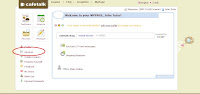
You can see the services you have,and you can check the category of each services.
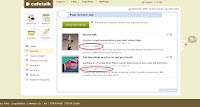
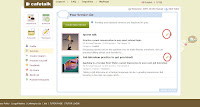
If you want to change the details of services including category,please click the pencil icon.
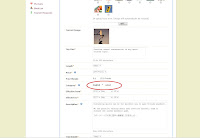
Then change the category.
Thank you!
Cafetalk Team
cafetalk here
You can login to you page, then click "services" button.

You can see the services you have,and you can check the category of each services.

If you want to change the details of services including category,please click the pencil icon.

Then change the category.

Thank you!
Cafetalk Team
cafetalk here
Interval function
Dear All,
The interval function is now released.
You can now set "Interval" to 30Min in your profile.
If you set the 30Min interval, the system will automatically block 30 minutes after the scheduled completion time of each request. Students will not be able to make requests during this time.
For example, if you have a 30 minute lesson starting at 16:00 the system will automatically block your schedule from 16:30 to 17:00. This could be useful if you would like to set aside some extra time between lessons in order to complete reviews or take a short rest.
Thank you.
Cafetalk Team
cafetalk here
The interval function is now released.
You can now set "Interval" to 30Min in your profile.
If you set the 30Min interval, the system will automatically block 30 minutes after the scheduled completion time of each request. Students will not be able to make requests during this time.
For example, if you have a 30 minute lesson starting at 16:00 the system will automatically block your schedule from 16:30 to 17:00. This could be useful if you would like to set aside some extra time between lessons in order to complete reviews or take a short rest.
Thank you.
Cafetalk Team
cafetalk here
Subscribe to:
Posts (Atom)